AutoCut Football

Turn 3+ hours of game film into individual plays in about 1/8 the time

Whether you're cutting your own film or digging through hours of opponent scouting video, AutoCut Football uses advanced AI to turn continuous sideline American football footage (including flag football and 7-on-7) into individual plays in about 1/8 the time. Then tag each play, filter by situation, and share a Game Report.

Download on the App StoreAvailable for iOS and Mac on the Apple App Store · Watch the intro & how-to ▶
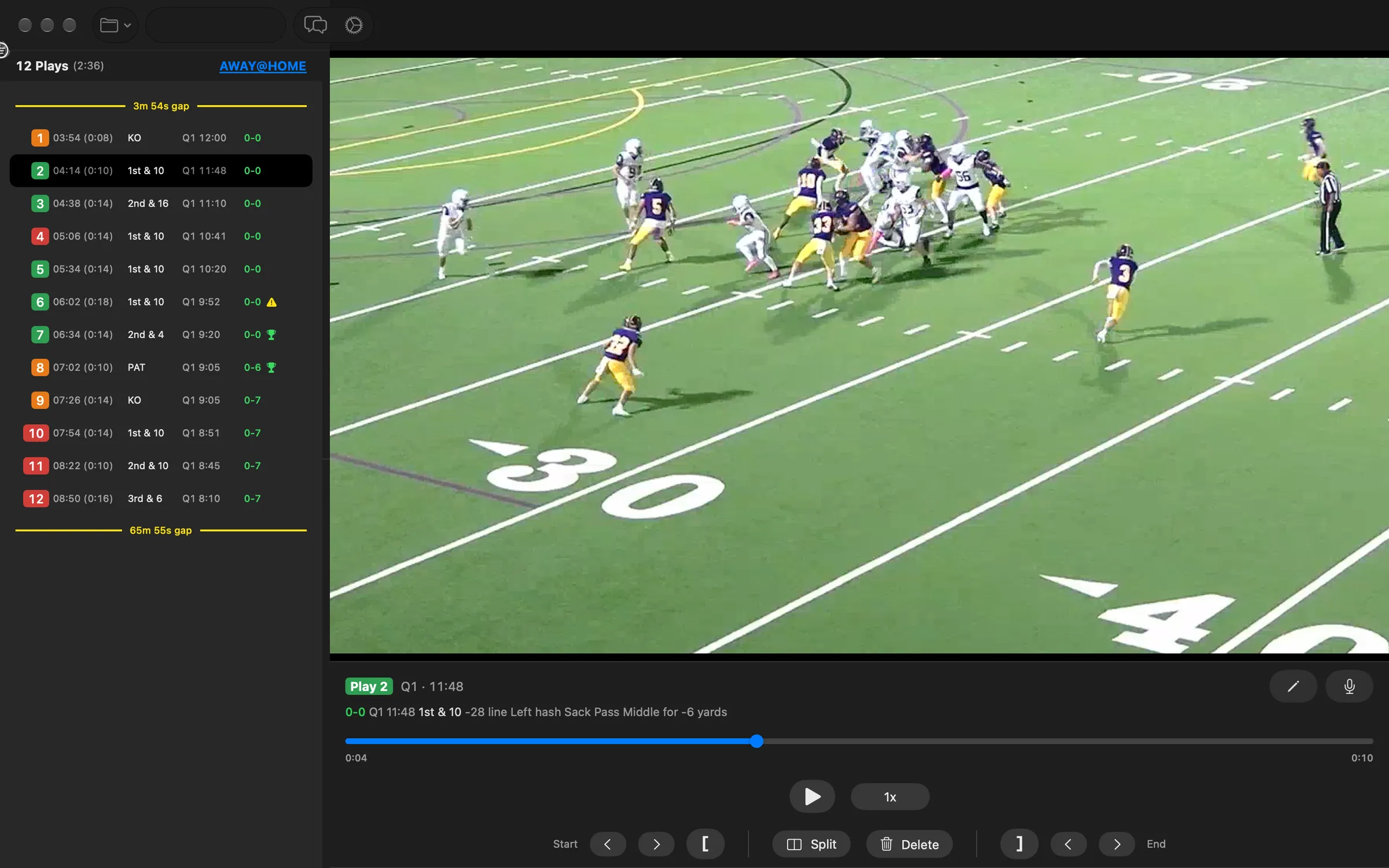
AutoCut Football main window with the cut play list and video player
AI-powered detection

Automatically identify start/end of plays from continuous game footage. Score, down & distance, quarter, and time are auto-filled only when they appear as on-screen graphics (a score bug) in the video.

Save hours of review time per video

Trim 4+ hours of editing down to 30 minutes or less!

Quick editing tools

Adjust play start/end times. Split plays or delete misidentified plays. Watch at up to 3x speed.

Customizable thresholds

Configure pre/post roll footage to match your preferences.

iCloud sync

Play data syncs across all devices using your Apple ID.

Flexible export

Export plays as individual clips for your platform of choice.

Try before you buy

Free for up to 10 plays per video.

Our team won their semi yesterday and AutoCut had an important role in that. I used it to cut down a bunch of film for the coaches, and using the new tagging we noticed several key trends (it suddenly became clear that the opponent almost always went run middle or run right, and only ever went run left of the right hash, and barely passed left ever, etc).

As a result we adjusted our D-Line plays and we kept them to zero 1st downs. Was still a very close game (14-12), but I am positive AutoCut analysis was a key difference! So big thanks from the Park City Miners - 2026 Mity Mite team! On to the Wildcat Bowl final next week......

— Andrew

Quick Analysis

If your sideline film shows score, down & distance, quarter, and time remaining as on-screen graphics (a score bug), AutoCut Football can also read them to help you understand the clips, identify any potential issues with the cuts, and quickly cut out any extra pre-game, halftime, and post-game footage. Without those on-screen graphics in the video, these fields aren't filled in automatically.

  • Live editing
    Review and edit plays while processing video.
  • Quick play review and trimming
    ~30 minutes.
  • Keyboard shortcuts
    Speed up your editing workflow.
  • Undo/Redo support
    Easily fix mistaken edits.
  • Leverage game info
    When score, down & distance, and time appear as on-screen graphics in the video, unexpected sequences are highlighted for review.
  • YOLO
    Do nothing but upload to your team management platform and let it filter out the non-plays.
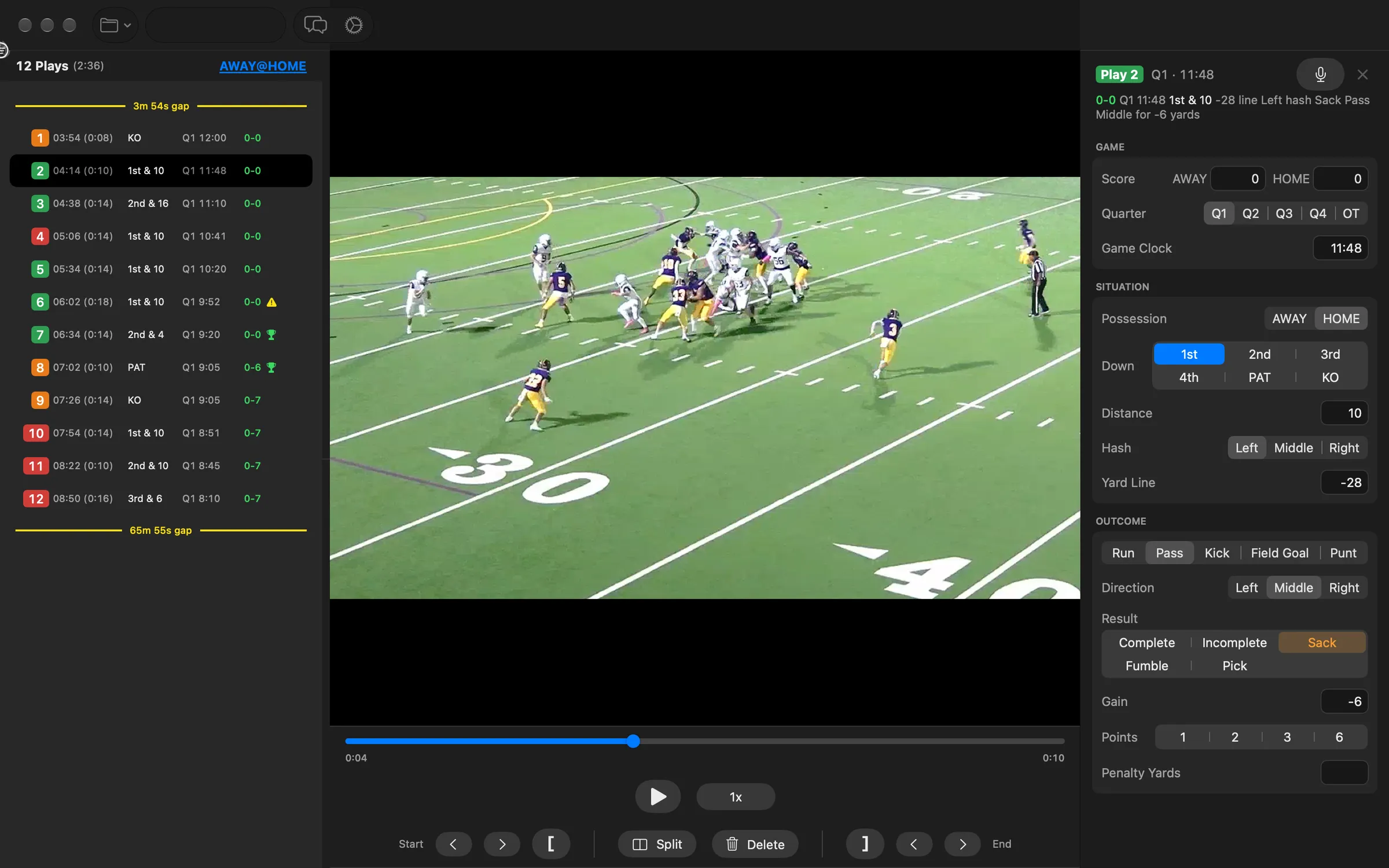
AutoCut Football play information editor

Chart every play

  • Play information editor
    Down, distance, yard line, play type, result, and more.
  • Colored play numbers
    Offense, defense, and kicking at a glance, with scoring and penalty marks.

Tag every play with down, distance, yard line, play type, and result by typing or just saying it, then filter the play list and share a full Game Report as a PDF.

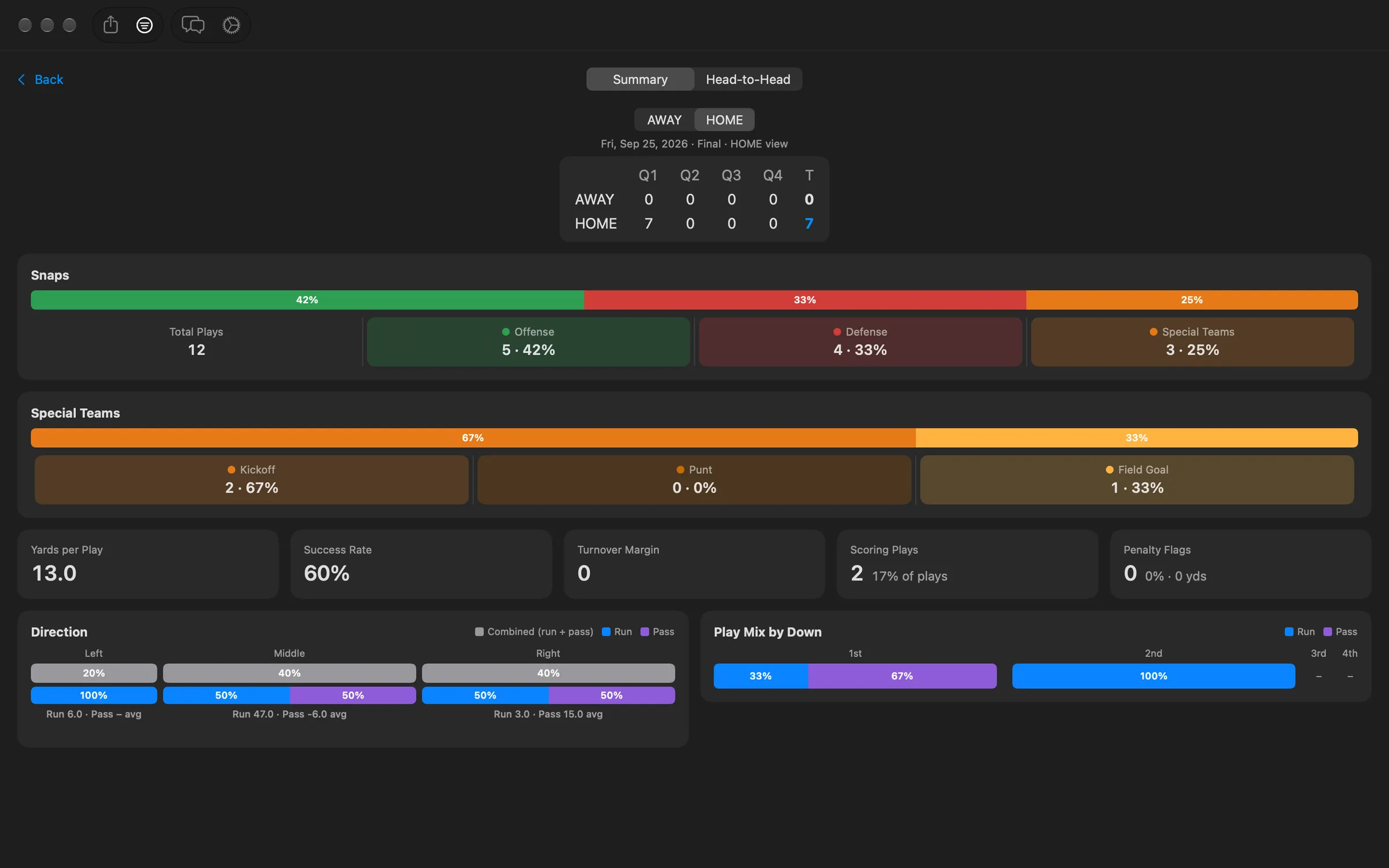
AutoCut Football Game Report dashboard

Game Report

  • Full game stats
    Offense, defense, kicking, turnovers, and scoring by quarter.
  • Head-to-Head
    Both teams side by side.
  • Share as PDF
    Send it to your staff in one tap.

Everything included

  • Use AI to automatically identify start and end of plays
  • Quick editing tools to adjust plays as needed
    • Add/Remove a couple of seconds from the start or end of a play
    • Specify play start/end points manually
    • Split a play into two
    • Delete incorrectly identified plays
    • Undo/Redo your edits
  • Watch plays at up to 3x speed to save time
  • Read score, down and distance, quarter, and time remaining, only when they appear as on-screen graphics (a score bug) in the video
  • Tries to identify replays and skip over them
  • Play information editor for possession, down (including PAT and kickoff), distance, yard line, play type, result (including Pick and Fumble), penalties, points, and more
  • Enter play information and navigate the video by voice or natural language
  • Filter plays by possession, down, play type, result, points, distance, or gain
  • Game Report with offense, defense, kicking, turnovers, scoring by quarter, and Head-to-Head stats, shareable as a PDF
  • Play numbers colored by offense, defense, or kicking, with marks for scoring plays and penalties
  • Warnings for plays that are shorter or longer than you set
  • Game Info keeps team names, the game date, and which side is your team
  • Configurable thresholds for how much extra footage to include before or after the play to match your preferences
  • Analyzed play data synchronized across all your devices using your Apple ID (all devices must have access to the same video file)
  • Export the plays as individual videos or a single combined file so you can upload them to your platform of choice, or as a CMX 3600 EDL (.edl) for import into editors like DaVinci Resolve
  • Add a Score Bug with the score, down, and quarter, burned into the video or as an .srt caption file
  • Optional Play Info CSV export for your spreadsheets
  • Works best on iPads and Macbooks with Apple Silicon M series processors

Also check out AutoCut Volleyball — our AI-powered rally cutting tool for volleyball.